Pulsy
Create account
How Pulsy works

Two ways to read it. One system underneath.

Walk through the day of a member and a caregiver, or see the services that make it run. Every flow has a short narrated video.

FLOW A

Onboarding

Two accounts, one link. Takes about three minutes on each phone.

MemberCaregiverPulsy
  1. Member creates an accountName, phone, and date of birth, which is required.
  2. Chooses "I take medicines"Anyone can do both roles later.
  3. Invites a caregiverBy phone number, a WhatsApp invitation, or the Pulsy ID shown on their profile.
  4. Caregiver accepts the invitationIf the caregiver is under 18, Pulsy warns and asks to confirm.
  5. Caregiver adds their own emergency contactsOrdered list: family, neighbors, then the doctor.
  6. Caregiver sets vital limits and a safe zoneHeart rate, oxygen and glucose ranges per person; a circle around home on the map.
0:23
Narrated walkthroughMember and caregiver phones
FLOW B

Adding medicines

One photo. Pulsy fills in the rest.

MemberPulsyAmazon Bedrock
  1. Tap "Add a medicine"
  2. Photograph the tablet strip or the prescription
  3. Amazon Bedrock reads the photoName, dose and times are filled in automatically.
  4. A friendly nickname and a translation"The white sugar tablet", in English, Spanish, Hindi or Telugu.
  5. Review and saveAlarms are scheduled on the server from this moment.
0:17
Narrated walkthroughMember phone
FLOW C

Daily dose

Three alarms, then the family. The decision lives on the server, so a flat battery does not silence it.

MemberPulsyCaregiver
  1. Alarm 1 at dose time, with the strip photoBig "Mark as taken" and "Remind me in 5 minutes" buttons.
  2. Alarm 2 at +5 minRings through Do Not Disturb.
  3. Alarm 3 at +10 minFinal, full screen.
  4. At +15 min the server marks the dose missedWindow is 15, 20 or 30 minutes per member.
  5. Caregiver is toldWhatsApp, SMS, email, in-app alert. See Flow D for the escalation.
  6. Every day: check-in, 7-day adherence, refill warningsVoice labels read the tablet name aloud for members who prefer listening.
0:20
Narrated walkthroughAlarm screen and timeline
FLOW D

Emergency

Six things start it. One agent decides who to reach. Nothing stops until someone takes responsibility.

MemberEmergency contactsCaregiverAmazon BedrockAWS messaging
  1. TriggerMissed dose, vitals outside limits, fall, crash, SOS press-and-hold, or leaving the safe zone. Fall and crash show a 30-second "Are you okay?" countdown first.
  2. Amazon Bedrock agent reads the situationEvent, location, latest vitals, medical ID and the emergency contact list.
  3. Agent decides the order and drafts the messagesFamily and neighbors before a distant doctor. SMS, WhatsApp, email and a voice script, tailored to the event.
  4. Contact 1 is reached on every channel at onceWhatsApp and SMS (AWS End User Messaging), email (Amazon SES), a voice call (Amazon Polly), and a loud in-app ringtone.
  5. The call asks "say I acknowledge, or press 1"
  6. No acknowledgement in 90 seconds: contact 2, then contact 3One by one, until someone answers.
  7. Nobody responds: emergency live viewVideo opens on the member's phone with a red banner on screen the whole time and one tap to end it. Never hidden.
  8. Any acknowledgement stops the escalation for everyoneLogged: who was told, who answered, and when.
1:26
Narrated walkthroughTriggers, agent, channels, call, caregiver phone, fall
FLOW E

Everyday monitoring

Peace of mind on an ordinary day, and a head start before the doctor's visit.

CaregiverMemberDoctor
  1. Caregiver opens the member's pageHeart rate, oxygen, glucose, and the last 24 hours.
  2. Vitals arrive automaticallyApple Health on iPhone, a Wear OS watch, or a continuous glucose monitor.
  3. Live location, with "Update now"Amazon Location map; the safe zone is drawn here too.
  4. Check in on video, with consentThe member sees "Emily is checking in" and chooses Acknowledge or Decline. A banner stays on screen during the call.
  5. Home IP camerasCameras the member registers can be viewed by the caregiver.
  6. Doctor talking pointsThirty days of doses and vitals turned into plain-language points and questions to ask. One tap to share with the doctor.
0:52
Narrated walkthroughVitals, location, check-in, doctor brief
FLOW F

Health wallet

Lab reports, doctor notes, insurance, prescriptions and discharge papers in one place, explained in plain language.

MemberCaregiverDoctorAmazon Bedrock
  1. Photograph any documentLab report, doctor's note, insurance card, prescription, discharge summary. Pulsy files it under the right type and date.
  2. Lab reports get a plain-language summaryWhat each value means, what is outside the normal range, what is worth asking about.
  3. Doctor notes stay next to the visitInstructions like "recheck HbA1c in 3 months" are kept and surfaced before the next appointment.
  4. Insurance and medical ID ready at the deskPolicy details, blood group, allergies and conditions in two taps when a hospital asks.
  5. Doctor talking points pull it togetherThirty days of doses and vitals, the latest report, and questions to ask.
  6. Member decides who sees whatShare a single document with a caregiver or the doctor; everything is encrypted at rest.
0:24
Narrated walkthroughWallet, lab summary, talking points
TECHNICAL FLOW

iOS and Android, one backend, AWS at the core.

Every alert is decided on the server and delivered through AWS Communication Developer Services.

  1. AppsExpo / React Native for iPhone and Android. Apple Health (HealthKit) on iOS, a Kotlin Wear OS companion app on Android. Phones poll the API every 20 seconds for alerts.
  2. Pulsy APIFastAPI in Docker, JWT auth, PostgreSQL or SQLite, Amazon S3 for tablet photos and voice messages. A background worker runs dose escalation, the SOS/fall state machine, geofence checks and CGM ingestion.
  3. AgentAmazon Bedrock (Nova) through the Converse API: orders the emergency contacts, drafts SMS, WhatsApp, email and voice scripts; also reads strips and prescriptions and writes the doctor talking points.
  4. CommunicationAWS End User Messaging (SMS), AWS End User Messaging Social (WhatsApp), Amazon SES (email), Amazon Polly (voice) stored in S3 and played on a phone call with "say I acknowledge, or press 1".
  5. Location and videoAmazon Location Service for map tiles, tracker and geofence collection. Amazon Chime SDK for the check-in call and emergency live view.
  6. SecurityLeast-privilege IAM user, secrets in environment only, HTTPS, DOB with under-18 check, medical ID on alerts, full alert log.
Amazon BedrockAWS End User MessagingEnd User Messaging SocialAmazon SESAmazon PollyAmazon S3Amazon LocationAmazon Chime SDK
0:20
Narrated architectureiOS and Android to AWS

Devices

iPhone, Android, Wear OS watch, continuous glucose monitor, home IP cameras, caregiver phone.

Pulsy API and worker

FastAPI, Docker, JWT, PostgreSQL, S3. Escalation state machine runs here, not on the phone.

Amazon Bedrock

Escalation agent, strip and prescription reading, nicknames and translations, doctor talking points.

AWS Communication Developer Services

End User Messaging for SMS and WhatsApp, SES for email. One contact at a time, every channel at once.

Amazon Polly and voice call

Neural voice message in S3, spoken on a phone call with an "I acknowledge" prompt.

Amazon Location and Chime

Maps, tracker and safe zones. Announced video check-in and emergency live view.
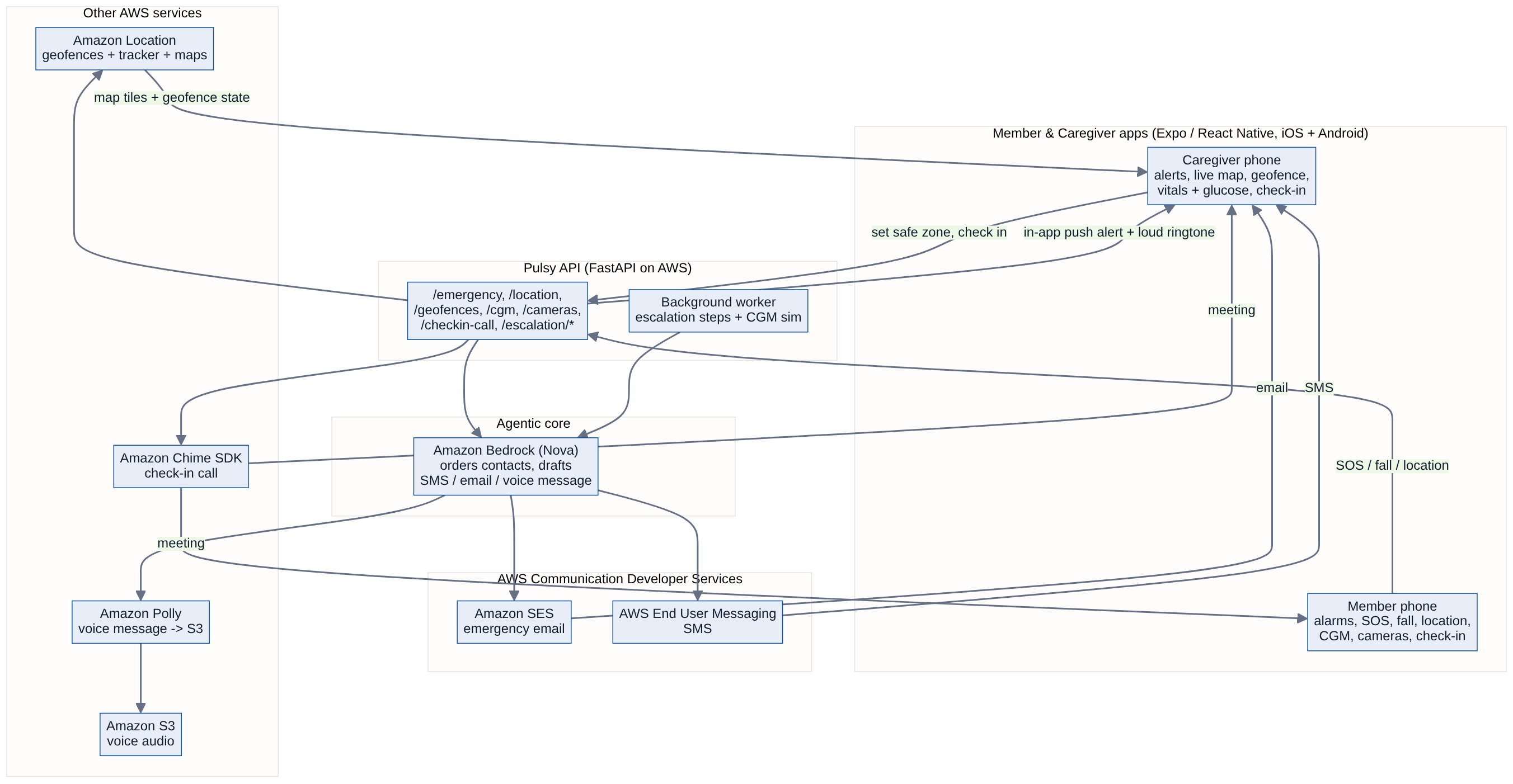
Pulsy architecture diagram